• About us
en
ites
  • Plant Design Software
    • ESAPRO Suite
      • Process Design
      • Plant Design
      • Electrical Design
      • Add-ons
    • Resold Products
  • Training and Support
  • Case histories
  • About us
  • News
    • All
    • News
    • Magazine
  • Contact
    • Contact us
    • Request Demo
    • Work with us
Request Demo
Magazine

P&ID Line List: Line List, Valve List and Instrument Index to Reduce Rework

Posted on 16 Mar at 13:21
Francesco Pais
P&ID line list

The P&ID line list is one of the most useful deliverables in plant design: it gathers line numbers, the main piping data, and the information needed to keep the process diagram consistent with the later design stages in an orderly way. Alongside the P&ID line list, the valve list P&ID and the instrument index P&ID are also essential for reducing errors, speeding up revisions, and limiting manual work in Excel sheets.

In many projects, time is not lost in creating the P&ID itself, but in managing the related project lists: counts, schedules, updates after a change, and checks to keep documents aligned. For this reason, it is useful to adopt a simple and repeatable method that makes it possible to export lists without counting items manually and to reduce rework from one revision to the next.

The operational goal is clear: obtain counts and schedules from the P&ID without relying on manual Excel work, avoiding the need to rebuild lists and quantities after every change. A well-structured P&ID line list, together with a consistent valve list P&ID and instrument list, makes it possible to work with comparable data across Rev A, Rev B, and Rev C, reducing typical errors related to duplicate tags, missing fields, and updates that are not propagated.
Designing a P&ID?

ESAPRO P&ID includes ready-to-use ISO/ANSI symbol libraries and automatically generates line lists, valve lists and the instrument index.

Discover ESAPRO P&ID

Below we will look at how to set up the three main lists correctly (line list, valve list, and instrument index) which fields to include, how to read P&ID line numbering, and how to manage revisions and quality checks with an approach that also suits SME engineering teams and with a concrete example.

Why P&ID Lists Matter During Revisions

When a P&ID changes, the most common risk is not losing the drawing, but losing consistency between the documents built around it: line list, valve list, instrument index, technical notes, and outputs for piping. If the lists are updated manually, every revision inevitably introduces repetitive activities and visual checks.

A properly structured set of P&ID lists instead makes revisions and changes easier to compare, reduces rework after a change, and limits situations in which piping and the P&ID drift apart without anyone noticing.

In a more structured workflow, the information contained in the P&ID is not tied only to graphics, but is managed as data: lines, valves, and instruments have associated attributes and can consistently feed project schedules and lists. This is the logic behind a data-driven P&ID, which reduces repetitive tasks and makes it easier to keep lists updated even when the diagram is revised. At ESAIN, this approach is supported by the ESAPRO P&ID module, designed to work on P&IDs while keeping the P&ID line list, valve list P&ID, and instrument index P&ID aligned throughout the project lifecycle.

How to Build a P&ID Line List

The Line List, or P&ID line list, is the list of lines shown in the diagram, with the minimum data needed to manage the project in later stages. In piping design workflows, people often refer to a piping line list, meaning the line list used as an operational reference for downstream consistency and checks. In plant engineering, it is also often called a line schedule: regardless of the name, the concept is the same, namely to make explicit the information that would otherwise remain scattered across the drawing and notes.

The P&ID line list is one of the most practical ways to maintain consistency between what is represented in the P&ID and what is developed in the following phases

Recommended Fields in a P&ID Line List

To avoid ending up with a complex file that is difficult to maintain, it is best to start with a few essential fields:

  • Line number / line tag
  • Service / Fluid
  • DN (nominal diameter)
  • Spec / Class (or material/standard if a complete coding system is not yet available)
  • PN / Rating (if applicable)
  • Insulation (Yes/No + type)

Notes should only be used when necessary, because too many notes make it harder to compare revisions and quickly identify important changes.

Example of a P&ID Line List and Common Errors

example of a P&ID line list

A simple and useful example of a P&ID line list is:

100-P-001 | Digestate | DN80 | CS-150 | PN16 | Yes (25 mm) | Slope 1% to drain

The mistakes that waste the most time are usually small but recurring: tags written differently in the P&ID and in the list, key fields left blank on main lines, and duplicate line numbers not detected before issue. When the piping line list is not aligned with the P&ID, checks become manual and rework increases.

P&ID Line List Legend: How to Read the Fields

The P&ID line list legend is useful both for the person compiling the list and for the person receiving it. In organisations where several people work on the same projects, a short legend reduces different interpretations and makes discipline coordination easier.

Let’s have a look at must have fields:

  • Line number / line tag: unique identifier of the line. It should remain stable across revisions.
  • Service: indicates what the line carries, such as process water, biogas, or condensate.
  • DN: nominal pipe diameter.
  • Spec / Class: family of allowed components, material, standard, or rating.
  • PN / Rating: pressure class, where required.
  • Insulation: it is best to standardise it, for example “Yes (25 mm),” instead of using generic notes.

There are optional fields as well:

  • Tracing: electric or steam tracing.
  • Design pressure / Design temperature: design conditions.
  • Notes: only for information that cannot be structured in another way.

P&ID Line Numbering: Rules and Reading Logic

There is no single universal format for P&ID line numbering. The structure often depends on the client, the industry, and internal project conventions. In many cases, a format such as AREA–SERVICE–SEQUENTIAL NUMBER is used, for example 100-P-001.

Regardless of the format, a few rules help reduce errors and ambiguity:

  • keep each line number unique
  • avoid changing the format between revisions
  • record any renumbering in the change log
  • use separate fields for service, spec and PN instead of putting everything into notes
  • treat line numbers as text in Excel so that zeros or characters are not lost

From symbols to project, without redoing everything by hand

ESAPRO P&ID starts from the standard symbology you are reading and connects it to the plant data.

  • Ready-to-use ISO/ANSI symbol libraries
  • Automatic line list, valve list and instrument index
  • Revision management and tracked changes
Discover ESAPRO P&ID
plan work for isolate

Valve List P&ID: What to Include

The valve list P&ID is the list of valves shown in the diagram, with the minimum information needed to ensure consistency and support downstream activities. It is a list that is often requested because it affects both procurement and technical decisions, and it is especially sensitive during revisions: even a small change in DN or rating can generate rework.

Recommended Minimum Fields

  • Valve tag
  • Valve type
  • DN
  • Rating
  • Spec / material
  • Actuation (if already defined)

A properly maintained valve list P&ID reduces two typical problems: having to count valves manually from the P&ID again and having to reconstruct afterwards what was actually added in a given revision.

Instrument Index P&ID and Instrument List Consistency

The instrument index P&ID, often also referred to as an instrument list, is the list of instruments represented in the P&ID. It is useful for keeping tags and types organised and for reducing situations in which an instrument is duplicated or overlooked from one revision to the next.

Recommended Minimum Fields

  • Instrument tag
  • Type (FT, PT, TT…)
  • Measurement point / service
  • Range (if available)
  • Signal (if available)

When the instrument list is consistent, it also becomes easier to manage related documentation such as datasheets.

How to Reduce Rework After a P&ID Change

The effectiveness of P&ID lists does not depend only on the fields they contain, but also on how they are versioned and controlled with consistent rules.

A practical and lightweight method includes three steps:

  • One revision = one list version
    (Rev A P&ID → Rev A lists)
  • Minimum change log
    additions, deletions, and edits to tags and critical fields (DN, spec, rating)
  • Quality checks before issue
    duplicates, blank mandatory fields, and obvious inconsistencies

Example Rev A → Rev B

  • line 200-P-003 added
  • DN of line 100-P-001 changed (DN80 –> DN100)
  • valve XV-14 added

With versioned lists and a change log, these variations become visible without rebuilding counts from the drawing and without unnecessary rework: a new row appears immediately in the P&ID line list, a change is visible in a critical field such as DN, and a new row appears in the valve list P&ID, with everything also recorded in the change log.

Excel Example: P&ID Line List, Valve List and Instrument Index

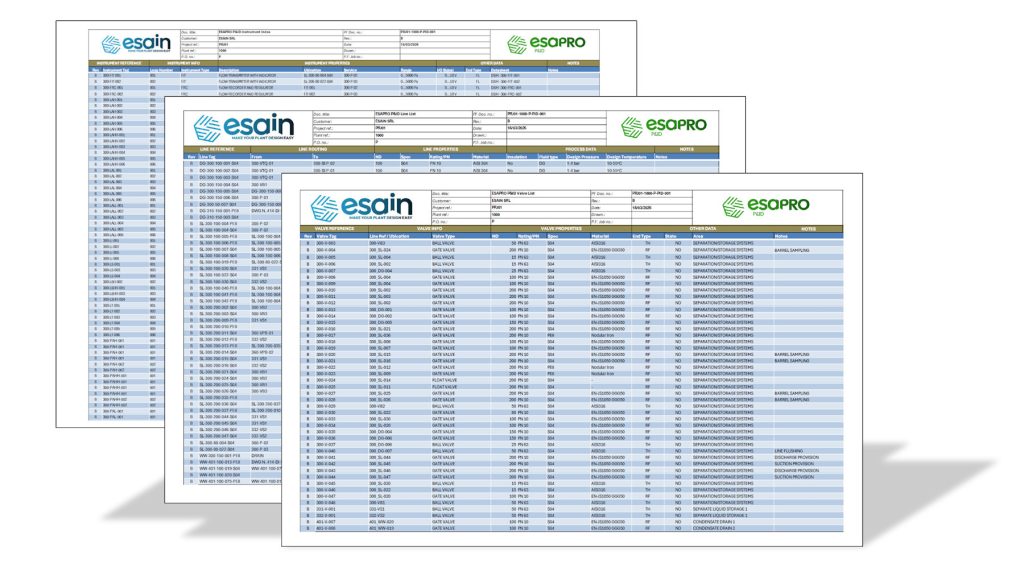
To show more clearly what can be obtained from a data-driven P&ID, we prepared an example of P&ID lists exported from ESAPRO P&ID in Excel format, to show the result that can be generated directly from the P&ID and the manual work that can be avoided: counts, copy-paste operations, recalculations, and visual checks after a change.

The file includes three exports consistent with the lists described in this article:

  • Line List
  • Valve List
  • Instrument Index

In practice, the example shows how, with each P&ID revision, the lists can be regenerated with a structure and field set that are already aligned. Instead of counting tags again and updating Excel manually, the team works on the diagram and generates the schedules consistently, reducing both the time spent on documentation and the risk that the P&ID and downstream disciplines such as piping and instrumentation become misaligned.

Download the example

The three P&ID lists (P&ID line list, valve list P&ID, and instrument index P&ID) are among the most practical tools for reducing rework after a change and maintaining consistency between the diagram and documentation. With versioned lists, an essential change log, and repeatable quality checks, revisions become manageable. And when the P&ID is handled with data-driven software, the lists do not need to be rebuilt manually: they are updated and regenerated consistently with the latest diagram revision. This is where the difference emerges between a CAD-based workflow and a more structured P&ID approach, especially as revisions, checks, and related documentation increase.

Do you want to reduce the time you spend on revisions and Excel lists?

One of our experts will show you how to manage P&IDs and lists in a data-driven way.

Request a demo

Similar posts

Best P&ID software with structured project data, native DWG, automatic lists, spec-driven design and revision control

Best P&ID Software: Key Criteria for Choosing the Right One

PIMM Plant Information Modeling & Management as a connection between BIM and the industrial Digital Twin

PIMM: Plant Information Modeling & Management for Industrial Plants

P&ID and 3D piping model representing the same industrial plant from complementary perspectives

Single Source of Truth for P&ID and 3D Piping: Reducing Rework and Data Silos

The ESAPRO suite

Software for industrial plant design. 800+ clients and 4,000+ installations worldwide.

Discover the ESAPRO suite

Latest articles

See you at Ecomondo 2026

4 weeks ago

ESAPRO moves to the cloud: simpler, more flexible licensing

4 weeks ago

Summer office closure

2 months ago

Categories

News 17
Magazine 47
Logo-Esain-Anniversary-white

About us

Since 1994, ESAIN has developed integrated software for industrial plant design. The ESAPRO suite covers P&ID, 3D piping modelling and electrical design, with over 800 clients and 4,000 installations worldwide.

The Company has benefited from the resources of the PR FESR LIGURIA 2021-2027, Bando Digitalizzazione 1.2.3

Coesione_Italia_Liguria

Products

  • ESAPRO P&ID Software
  • ESAPRO 3D Piping Software
  • ESAPRO Cable Trays Software
  • Add-ons
  • Resold products

Services

  • Training and support

News

See you at Ecomondo 2026

4 weeks ago

ESAPRO moves to the cloud: simpler, more flexible licensing

4 weeks ago

Summer office closure

2 months ago

Case history

  • All case histories

Follow us

LinkedIn
YouTube

ESAIN s.r.l. · +39 010311544 · info@esain.it · Via de Marini 1, WTC 8th floor – 16149 Genoa, Italy

Share capital € 50,000 · REA GE-347489 · P. IVA 03470480108

  • Privacy
  • Cookie