• About us
en
ites
  • Plant Design Software
    • ESAPRO Suite
      • Process Design
      • Plant Design
      • Electrical Design
      • Add-ons
    • Resold Products
  • Training and Support
  • Case histories
  • About us
  • News
    • All
    • News
    • Magazine
  • Contact
    • Contact us
    • Request Demo
    • Work with us
Request Demo
Magazine

AutoCAD P&ID vs intelligent P&ID: 7 differences that really impact your workflow

Posted on 27 Apr at 10:34
Francesco Pais
utoCAD P&ID vs intelligent P&ID

At first glance, AutoCAD P&ID and a software designed to create intelligent P&IDs, such as ESAPRO P&ID, may seem similar. Both allow you to create clear diagrams, insert symbols and build readable documentation.

But in real projects, the issue is rarely the first version of the P&ID. The real challenge comes later.

When changes increase, revisions multiply and information must stay aligned across drawings, lists and documentation, the P&ID stops being just a graphical output and becomes something that needs to be managed.

This is where the difference between AutoCAD P&ID and an intelligent P&ID software becomes evident.

Why this comparison really matters

In many CAD-based workflows, a significant part of the work happens outside the drawing. Lists are exported and managed in Excel, data is assigned manually and every change requires additional checks to keep everything aligned.

The result is a fragmented workflow: drawing on one side, data on another, controls handled manually. This may work at the beginning, but as the project grows it leads to rework, inefficiencies and higher risk of errors.

This is exactly where the operational differences between AutoCAD P&ID and software for intelligent P&IDs begin to emerge. The comparison refers to typical usage scenarios in P&ID workflows and may vary depending on the software configuration, internal procedures, and the level of customization adopted by the team.
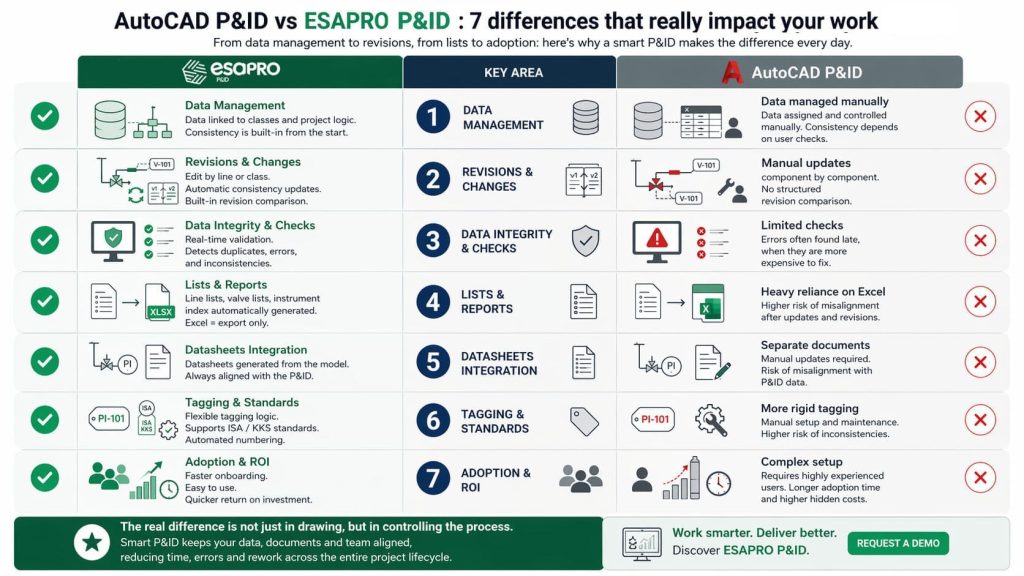
 

List 7 differences between AutoCAD P&ID e and ESAPRO P&ID

1) Data and class management: manual vs integrated

The most important difference between AutoCAD P&ID and software for intelligent P&IDs such as ESAPRO P&ID lies in how data is managed.

In a more CAD-centric environment, information is often added and maintained manually, using tools like Data Manager or external files. This means that data consistency is not ensured by the system, but depends on continuous user control.

With an intelligent P&ID, such as the one created with ESAPRO P&ID, data is directly linked to classes and project rules. This fundamentally changes the workflow: instead of drawing first and organizing information later, you work from the beginning within a structured environment, where data is inherently consistent by design.

When this consistency is guided by piping specs tied to line classes, teams move toward a P&ID spec driven workflow, reducing manual checks when requirements change.

2) Revisions and changes: where real productivity is measured

The real difference between the two approaches becomes clear when the project starts to change.

In a more CAD-centric workflow, such as the one many companies adopt with AutoCAD P&ID, every modification requires manual intervention: updating properties, checking components one by one, and verifying that changes have not introduced inconsistencies. This makes revisions slower and harder to manage, especially as the number of lines and components increases.

It is no coincidence that one of the main sources of rework in industrial plant projects is the P&ID change management, particularly when information control depends on manual verification activities.

With ESAPRO P&ID, changes can be managed at line or class level, ensuring more consistent updates and enabling the automatic detection of out-of-spec conditions. In addition, revision comparison allows you to quickly identify what has changed, reducing the need for extensive manual checks.

3) Checks and data integrity: preventing errors instead of chasing them

Another critical point is the software’s ability to detect errors while the work is being done.

Duplicate tags, repeated line numbers, disconnections, or out-of-class components are common issues in P&IDs. When a significant portion of checks remains the user’s responsibility, as can happen in workflows based on AutoCAD P&ID, errors tend to appear late, when fixing them is more costly.

An intelligent P&ID created with ESAPRO P&ID integrates these checks directly into the workflow. This allows teams to work with greater continuity, reducing the need for manual verification and increasing the overall reliability of the project.

4) Lists: Excel management vs automatic generation

In many cases, time is not lost in the drawing itself, but in producing the lists. When line lists, valve lists, or instrument indexes need to be created or checked manually, every revision becomes a critical point.

In this scenario, Excel becomes necessary, but it can also become a potential source of misalignment.

With a more structured approach such as ESAPRO P&ID, lists become a natural output of the P&ID. This does not eliminate Excel, but changes its role: from an operational tool to a simple export format. The benefit is immediate, especially when the project requires frequent updates.

5) Datasheets: separate documents vs integrated information

This issue goes beyond lists and also applies to datasheets. In a less structured workflow, technical datasheets often become separate documents that need to be updated manually, increasing the risk of misalignment between the P&ID, instruments, valves, and equipment.

In a more advanced approach, the P&ID is no longer just a graphical diagram, but becomes the central source of information from which other project deliverables are derived. It is no coincidence that in process design, datasheets and hook-ups can be generated from the P&ID, and that dedicated modules such as ESAPRO Instrumentation allow technical datasheets to be generated automatically while keeping them aligned with the diagram.

6) Tags, instruments and standards: consistency is built in the details

Aspects such as tag and instrumentation management also have a real impact on everyday work. Anyone who regularly works with P&ID symbol libraries and coding conventions knows how important it is to maintain continuity between graphical representation and design rules.

When numbering is rigid or not flexible enough, or when instrument management requires complex configurations, the risk is to introduce inconsistencies that become difficult to manage over time. An intelligent P&ID, on the other hand, allows numbering to be automated, supports standards such as ISA or KKS, and helps maintain consistency without adding manual work.

These are operational details, but they are exactly the kind of details where work either accumulates or is reduced.

7) Adoption and implementation: real ROI depends on simplicity

Finally, there is an aspect that is often underestimated: how long it takes for the team to start working effectively. A flexible environment that is more oriented toward advanced configurations may require experienced users and longer adoption times, increasing hidden costs. By contrast, a more accessible system that can also be managed by less experienced users, such as ESAPRO P&ID, supported by practical training and direct assistance, helps reduce the time needed to achieve tangible results.

For many companies, especially those working on medium-small plants and in sectors such as water treatment, biogas, biomethane, and hydrogen, this is one of the factors that has the greatest impact on return on investment.

The real comparison is between drawing and process control

The comparison between ESAPRO P&ID and AutoCAD P&ID is not only about drawing features. It is about how the project is managed over time.

On one side, there is a more CAD-centric approach, where data, revisions, and checks require more manual intervention. On the other, there is a more structured approach typical of an intelligent P&ID, where classes, information, and checks are part of the workflow from the very beginning.

At first, the differences may seem limited. But they become clear when the project grows, changes increase, and the team needs to work faster without losing control.

That is where the real difference between drawing a P&ID and truly managing it becomes measurable.

Do you want to reduce time, errors, and manual work in your P&IDs?

One of our experts will help you understand how to simplify your workflow and improve project consistency.

REQUEST A DEMO

Similar posts

Best P&ID software with structured project data, native DWG, automatic lists, spec-driven design and revision control

Best P&ID Software: Key Criteria for Choosing the Right One

PIMM Plant Information Modeling & Management as a connection between BIM and the industrial Digital Twin

PIMM: Plant Information Modeling & Management for Industrial Plants

P&ID and 3D piping model representing the same industrial plant from complementary perspectives

Single Source of Truth for P&ID and 3D Piping: Reducing Rework and Data Silos

The ESAPRO suite

Software for industrial plant design. 800+ clients and 4,000+ installations worldwide.

Discover the ESAPRO suite

Latest articles

See you at Ecomondo 2026

3 weeks ago

ESAPRO moves to the cloud: simpler, more flexible licensing

4 weeks ago

Summer office closure

2 months ago

Categories

News 17
Magazine 47
Logo-Esain-Anniversary-white

About us

Since 1994, ESAIN has developed integrated software for industrial plant design. The ESAPRO suite covers P&ID, 3D piping modelling and electrical design, with over 800 clients and 4,000 installations worldwide.

The Company has benefited from the resources of the PR FESR LIGURIA 2021-2027, Bando Digitalizzazione 1.2.3

Coesione_Italia_Liguria

Products

  • ESAPRO P&ID Software
  • ESAPRO 3D Piping Software
  • ESAPRO Cable Trays Software
  • Add-ons
  • Resold products

Services

  • Training and support

News

See you at Ecomondo 2026

3 weeks ago

ESAPRO moves to the cloud: simpler, more flexible licensing

4 weeks ago

Summer office closure

2 months ago

Case history

  • All case histories

Follow us

LinkedIn
YouTube

ESAIN s.r.l. · +39 010311544 · info@esain.it · Via de Marini 1, WTC 8th floor – 16149 Genoa, Italy

Share capital € 50,000 · REA GE-347489 · P. IVA 03470480108

  • Privacy
  • Cookie