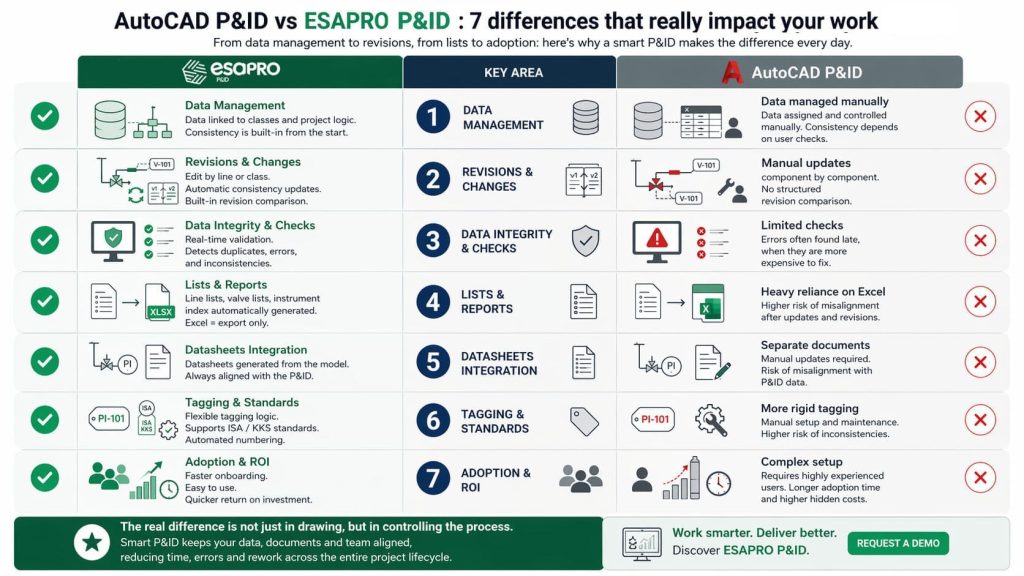
At first glance, AutoCAD P&ID and a software designed to create intelligent P&IDs, such as ESAPRO P&ID, may seem similar. Both allow you to create clear diagrams, insert symbols and build readable documentation.
But in real projects, the issue is rarely the first version of the P&ID. The real challenge comes later.
When changes increase, revisions multiply and information must stay aligned across drawings, lists and documentation, the P&ID stops being just a graphical output and becomes something that needs to be managed.
This is where the difference between AutoCAD P&ID and an intelligent P&ID software becomes evident.
Why this comparison really matters
In many CAD-based workflows, a significant part of the work happens outside the drawing. Lists are exported and managed in Excel, data is assigned manually and every change requires additional checks to keep everything aligned.
The result is a fragmented workflow: drawing on one side, data on another, controls handled manually. This may work at the beginning, but as the project grows it leads to rework, inefficiencies and higher risk of errors.
This is exactly where the operational differences between AutoCAD P&ID and software for intelligent P&IDs begin to emerge. The comparison refers to typical usage scenarios in P&ID workflows and may vary depending on the software configuration, internal procedures, and the level of customization adopted by the team.